
Harvest Mate is a free web-based portal and app designed to help cane growers and harvesting contractors capture additional cane and sugar yield from the paddock.
Using industry data and economic analysis, Harvest Mate is a practical framework to optimise harvest settings to increase yield and revenue. Harvest Mate provides growers and contractors with an opportunity to increase cane and sugar yield. Industry trial results showed an average of five per cent increase in yield with the potential to deliver an additional $116/ha, after paying both harvesting costs and levies.
It was developed and funded over three years by Sugar Research Australia (SRA) and the Department of Agriculture and Fisheries, (DAF) with input and support from sugarcane growers and contractors across the industry. It is easy to use and free, making it accessible to anyone who wants to improve their harvest practice in Australia.
Harvest Mate is designed to improve productivity and profitability
Harvest Mate is designed to help Australian sugarcane growers and harvesting contractors assess if there is economic benefit in changing equipment settings by exploring comparative scenarios. Data is entered into the tool by harvesting contractors which then Harvest Mate algorithms are used to predict whether a change in settings/practices could result in a net benefit to the grower.
The net benefit is based on the change in revenue minus the change in costs. After years of investigations and trials, Harvest Mate is now providing invaluable information to sugarcane growers and harvesting contractors on how to get the most efficient harvest out of their field.

How Harvest Mate works
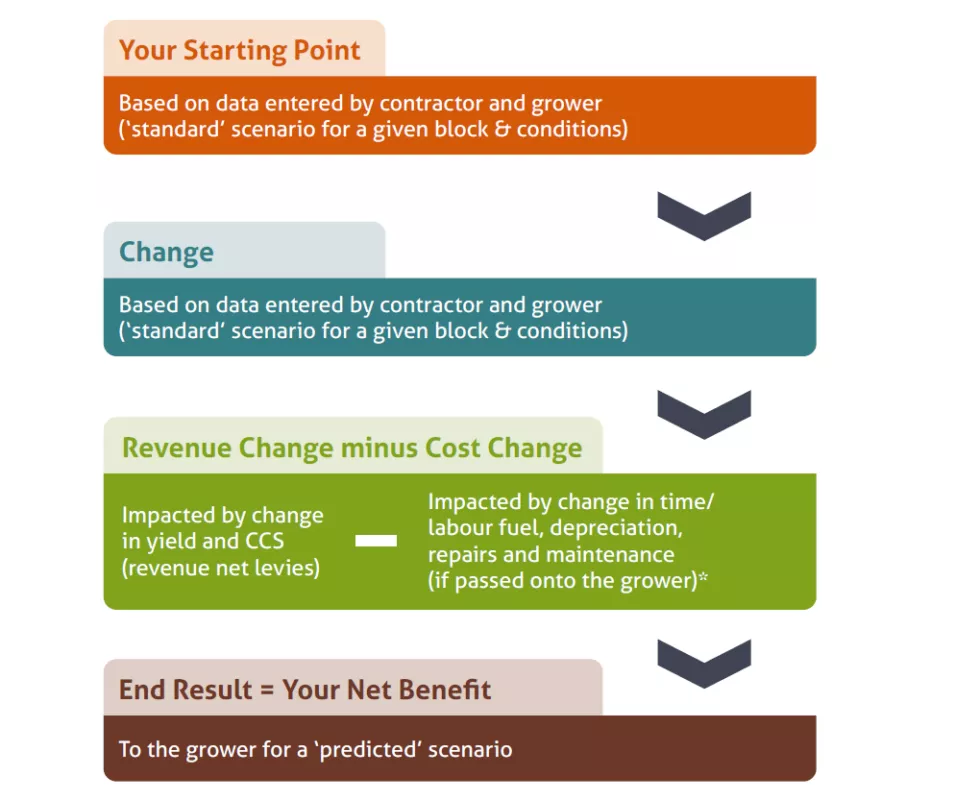
Note 1:* When comparison scenarios are completed you have the option to specify allowances (e.g. haulage allowance, night allowance, Sunday allowance) if applicable. Users are responsible for deciding whether to specify any allowances.
Note 2: For more information, see the ‘COMPARISON SCENARIOS’ section of the Harvest Mate user Guide located in the information section of the Harvest Mate web portal. When you complete a comparison scenario the Harvest Mate results:
– are instantly shown for a range of flow rates from 80 to 130t/hr (with ground speed, fan speed and other factors such as topping);
– are shown in order of each option’s net benefit to the grower; and
– display the hours per day estimated for each option
Note 3: Fixed costs can also be entered by contractors. These won’t impact grower net benefit but will impact the total operational cost visible to contractors as a result of comparison scenarios. Please refer to the ‘machinery & labour / additional costs’ section of this Guide for more info.
Watch the 2 minute registration video above or read the steps below to get started.
Harvest Mate is designed to:
- Use the growers’ block and crop information in addition to harvester, haul-out and labour details and harvest conditions to predict the most optimal harvest settings for the growers’ business.
- Harvest Mate provides growers and contractors with an opportunity to increase cane and sugar yield. Industry trial results showed an average of five per cent increase in yield with the potential to deliver an additional $116/ha, after paying both harvesting costs and levies.
The Harvest Mate app has been developed through a collaboration between Sugar Research Australia (SRA) and the Queensland Department of Agriculture and Fisheries (DAF).
The decision-support tool uses data collected by SRA from years of trials across the sugar industry and is supported by detailed economic data collected and analysed by DAF.
STEP 1: Click sign-up to CREATE AN ACCOUNT.
Visit harvestmate.au and then select profile type to register as a grower or harvesting contractor.
Note: for simplicity, sections in the remainder of this Guide often refer to a user registered in Harvest Mate:
– as a ‘contractor’ for users who select the harvesting operator/contractor option;
– as a ‘grower’ for users who select the sugarcane grower option; and
– as ‘you’ (as a user of Harvest Mate or, in a more general sense, to you as a person).
Tip: If you are a harvesting contractor AND grower, you should register as a harvesting contractor.
STEP 2: Complete all required fields
(These are: User Type, First Name, Last Name, Email, Phone Number, Password, Password Confirmation).
You will not be allowed to register until you have included a password with a mixture of uppercase and lowercase letters, symbol/s, number/s that is at least 8 characters long.
- Read and accept the Harvest Mate terms of use and privacy policy.
- Tick the check-boxes to indicate your acceptance of Harvest Mate terms of use and privacy policy.

STEP 3: Verify your account
To verify your Harvest Mate account, an email with a code will be sent to the email you specified on the CREATE AN ACCOUNT page.
- Open your email to get the code. You may need to wait a short time for the verification email with the code to arrive in your email inbox and/or check your email spam/junk folders for the verification email.
- Once you have the code from the verification email, go back to the ‘CONFIRM SIGN UP’ page in your web browser and enter the code that you received via email. Click ‘send code’ to confirm sign up.
STEP 4: Download the Harvest Mate App
Visit the Apple store or Google Play store to download this app. You must complete steps 1,2 and 3 before you download the app because your registered account will be used for verification and authorisation to use the Harvest Mate app.
What app store do I use for this FREE app?
If you have an Android phone go to Google Play Store
If you have an iPhone visit the App Store
Note 1: If you have any issues or questions at the sign-up stage please email harvestmate@sugarresearch.com.au
Note 2: In order for harvesting scenarios comparison to be completed, grower/s need to link with a harvesting contractor so that production data can be exchanged. This link is initiated by the contractor sending an invitation to the grower via Harvest Mate (see ‘GROUP AND OPERATIONAL SET-UP’ section in the Harvest Mate user guide located in the information section of the Harvest Mate web portal.
You are responsible for ensuring that you are dealing with the correct person and using correct email addresses in this process. You may want to consider meeting up face to face with the grower/contractor when the invitation is sent/accepted and when production data is exchanged.
VISIBILITY OF SECTIONS AND RESULTS
What sections of Harvest Mate can growers and contractors view?
Contractors Growers
Note 1: Growers can’t see all parameters entered by the contractor (e.g. into machinery and labour setup section), so it is at the discretion of the contractor as to whether they share those parameters with a grower (e.g. by opening the contractor account on a laptop/desktop to share them).
What results can growers and contractors view? (see also: ‘COMPARISON SCENARIOS’ section of the Harvest Mate user guide located in the information section of the Harvest Mate web portal).
After completing a comparison scenario in the Harvest Mate web portal and mobile app:
– The relevant contractor and grower can both see the ‘standard’ and ‘predicted’ harvester settings and ‘predicted’ Net Benefit to the grower of the potential changes in harvester settings;
– Growers can see the grower tab, that has a focus on any key changes, including cost changes; and
– Contractors can also see an additional contractor tab, that shows the ‘absolute cost’ of operations (that a comparison scenario is based on).
Note 2: Harvest Mate is designed to help you assess if there is a benefit in changing equipment settings by exploring comparative scenarios. So, the focus of the tool is on key changes. Please refer to the Harvest Mate terms of use before you use Harvest Mate for another purpose.
Note 3: Results are impacted by data entered by the contractor, the parameters of a grower’s block, and/or a specified ‘standard’ production scenario.
For further details of setting up a profile please go to the information section on the Harvest Mate web portal.
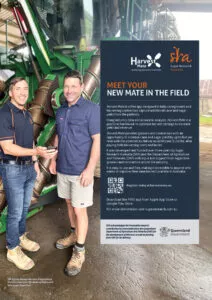
Harvest Mate Brochure
Cane Matters 2023
Spring Edition story
Cane Matters 2022
Summer Edition story
More information
If you would like to know more about Harvest Mate contact:
SRA District Manager Northern and Agricultural Machinery Specialist, Phil-Anthony Patane
email: harvestmate@sugarresearch.com.au
Acknowledgements
SRA acknowledges the invaluable research contribution by economists from the Queensland Department of Agriculture and Fisheries (DAF) for the development of this tool, as well as funding from DAF for its delivery.
